

SmartAPEX DIN-Rail automation node APX-DI16-BA
16-Channel Digital Input Module
Isolated 16-channel digital input module for integration with SmartAPEX DIN-rail modules or MINI-IP via CAN-BUS. Built for sensors, dry contacts and status signals.
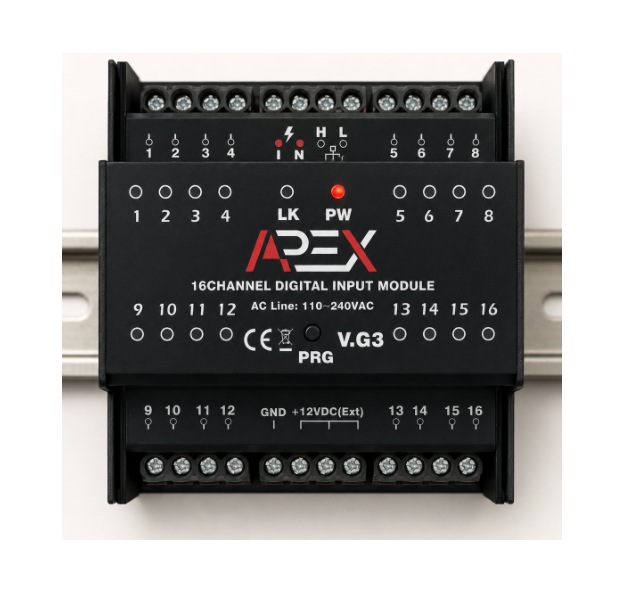 Manual render shown · real studio photo pending
Input channels
Channel design
Network
Input trigger level
Installation-ready highlights
Sixteen isolated field inputs, one compact module.
16 Isolated Channels
Helps reduce interference and improves reliable field signal.
Per-Channel Indicators
Each input channel includes a front LED indicator for easier monitoring.
External Trigger Supply
Supports digital input operation using external 12–24VDC trigger wiring.
CAN-BUS Integration
Works with SmartAPEX DIN-rail modules and MINI-IP through CAN-BUS.
Dry Contact Support
Suitable for contact-based signals such as switches, relays and sensor outputs.
Compact DIN-Rail Form
Designed for cabinet installation with front access and simple wiring.
Per-Input Configurable Timer
Every input channel has its own internally configurable timer — no external timer hardware needed.
Product overview
Signal collection for smart panels and industrial automation.
The APX-DI16-BA collects dry-contact and digital input signals, reports them over CAN-BUS and integrates easily with SmartAPEX controllers and distributed cabinet systems.
Distributed Input Expansion
Add 16 field input points to SmartAPEX DIN-rail systems with one compact module.
Contact Input Focus
Designed for contact-style monitoring, including open/close status collection from sensors and outputs.
Status Visibility
Front LED indication supports channel-level visual checking during commissioning and service.
Industrial Fit
Suitable for building automation, security/status monitoring and utility signal collection.
External Trigger Ready
Designed to work with external 12–24VDC trigger methods, as shown in the application schematic.
SmartAPEX Ecosystem
Integrates with SmartAPEX DIN-rail modules and MINI-IP through CAN-BUS.
Application map
Typical usage scenarios.
Motion & occupancy sensors
Collect contact outputs or compatible digital status signals from motion and occupancy devices.
Door / window contacts
Monitor magnetic contacts and status contacts for security or automation logic.
Panel / equipment status
Read dry-contact status from third-party devices, relays, breakers or alarm outputs.
General automation inputs
Use as a distributed contact-input interface for cabinet and field automation tasks.
Sample schematic
Reference wiring concept.
The supplied file included a sample schematic showing CAN-BUS connection, AC supply and external 12VDC trigger wiring for sensor / contact use.
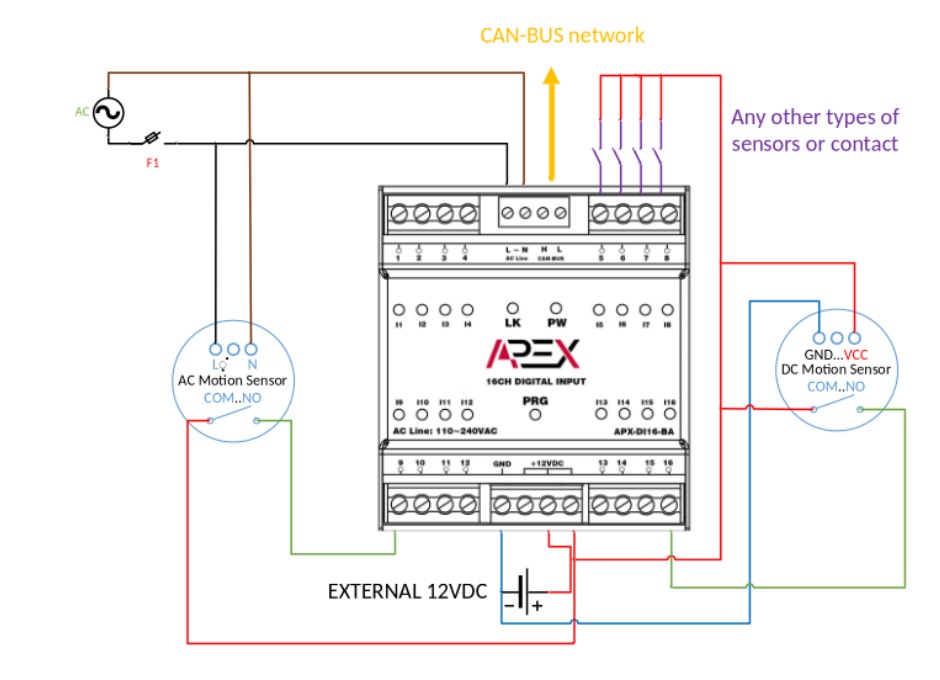
- AC powerThe sample schematic shows the module powered from AC line input.
- CAN-BUS networkThe module exchanges data with the SmartAPEX network using CAN-BUS.
- External 12VDCAn external 12VDC source is used in the sample concept for input triggering / sensor power.
- Sensor examplesThe schematic shows AC motion sensor and DC motion sensor examples, plus any other compatible contact-output sensor type.
How to position the module
Best used as a distributed field input collection point.
The APX-DI16-BA is best used as a distributed field input collection module inside the SmartAPEX ecosystem.
System Integration
Connect the module to compatible SmartAPEX DIN-rail modules or MINI-IP using CAN-BUS. Use it as a remote contact-input expansion point for automation logic, monitoring or supervisory workflows.
Binding / Direct Control
Bind individual inputs directly to other SmartAPEX CAN-BUS devices — keypads, relay channels, thermostats and DIN-rail modules — for local, controller-free automation logic.
Typical Input Sources
Dry contacts, magnetic contacts, motion sensor outputs, equipment alarm outputs, relay feedback contacts and other open/close status signals — when their electrical behavior matches the supported wiring method.
Specifications
Technical product specifications.
Product manual
Install and commission with the exact technical guide.
Covers specifications, mechanical layout, sample wiring concept and integration notes for the 16-channel digital input module.