

SmartAPEX network automation gateway APX-MIP-P
MINI IP Gateway
PoE-powered Ethernet gateway for SmartAPEX CAN devices, Modbus TCP-to-RTU and supported RS485 curtain motors. One shared hardware unit, three mutually exclusive firmware roles.
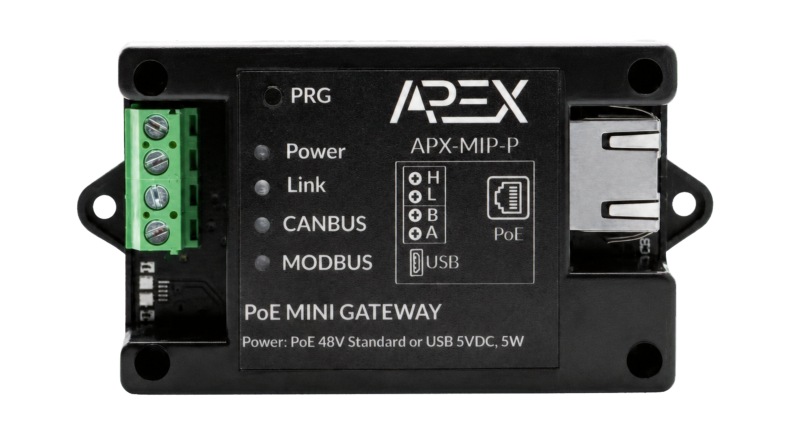 Manual render shown · real studio photo pending
Firmware roles
Standard PoE input
Modbus devices*
Bus interfaces
* Advanced capacity depends on RS485 wiring and polling interval.
Where it fits
One gateway, four practical jobs in the panel.
Pick the firmware role that matches what’s actually being connected.
CAN-to-Ethernet for APEX
Bridges SmartAPEX CAN-BUS devices to Ethernet for discovery, configuration and control — the Standard V40 role.
HVAC integration
Connects HVAC systems such as Daikin, Intesis, CoolMaster and similar gateways over Modbus.
Modbus power meters
Adds RS485 Modbus energy / power meters to the network through the Modbus Bridge role.
RS485 electric curtains
Controls supported RS485 curtain motors through the MiCURTAIN Bridge role and QuickApp.
Select the correct firmware role
One gateway, three mutually exclusive jobs.
The hardware is shared by three firmware roles, but only one role can run at a time. Installing a new role replaces the current role.
Standard V40
Normal SmartAPEX CAN, built-in Modbus/HVAC, templates and full gateway services.
Modbus Bridge
Transparent Modbus TCP-to-RTU for Fibaro/Yubii or another Modbus TCP client.
MiCURTAIN Bridge
Control supported RS485 curtain motors through the supplied QuickApp.
| Installation requirement | Firmware role | Current package |
|---|---|---|
| Normal SmartAPEX CAN, built-in Modbus/HVAC and full gateway services | Standard Mini IP V40 | MINI_IP_vX.XXX.bin |
| External Modbus TCP client to RS485 meters or slaves | Mini IP Modbus Bridge | MINI_IP_MODBUS_BRIDGE_vX.XXX.bin |
| Supported RS485 curtain motors controlled by Fibaro/Yubii | Mini IP MiCURTAIN Bridge | MINI_IP_CURTAIN_vX.XXX.bin |
Role 01
Standard SmartAPEX Mini IP V40.
The normal Mini IP gateway role for SmartAPEX CAN devices, built-in Modbus/HVAC configuration and standard TCP integration.
MINI_IP_vX.XXX.bin| Function area | Standard V40 capability |
|---|---|
| Ethernet gateway | Normal SmartAPEX TCP/IP services and web configuration. |
| CAN devices | Discover, configure, refresh and bind compatible SmartAPEX CAN devices. |
| Modbus RTU | Built-in bus, device and point configuration; register logic stays in Mini IP. |
| HVAC / templates | Built-in HVAC mapping, device templates and point configuration. |
| Maintenance | Network, diagnostics, reset and firmware update pages. |
Do not use this role when
- A third-party client expects a transparent Modbus TCP-to-RTU gateway.
- A Fibaro Eastron QuickApp must send its own Modbus TCP requests directly to an RS485 meter.
- The installation uses the proprietary MiCURTAIN motor protocol.
Important distinction. The Standard V40 Modbus section manages its own devices and points. It is not the same product role as the transparent Modbus Bridge and does not expose the same port-1502 workflow.
Role 02
SmartAPEX Mini IP Modbus Bridge.
A transparent Modbus TCP-to-RTU bridge for Fibaro/Yubii or another standard Modbus TCP client.
MINI_IP_MODBUS_BRIDGE_vX.XXX.bin- Receives a Modbus TCP request and preserves its transaction ID.
- Converts Unit ID and PDU to Modbus RTU on RS485.
- Validates the RTU response and returns a Modbus TCP response.
- Serializes RS485 requests so only one RTU transaction is active at a time.
- Does not decode Eastron values — register interpretation remains in the external client or QuickApp.
| Setting | Default |
|---|---|
| Network | DHCP enabled |
| Modbus TCP | Port 1502 |
| RS485 | 9600, 8N1 |
| RTU timeout | 3000 ms |
| TCP clients | 1 simultaneous |
Fibaro / Yubii settings
| Parameter | Example | Meaning |
|---|---|---|
| Gateway_IP | Mini IP bridge address | Target gateway IP. |
| Gateway_Port | 1502 | Transparent Modbus TCP port. |
| Modbus_Address | Meter slave ID | RS485 Unit ID selected by the client. |
| Read_Every | 30 s or slower | Recommended polling interval. |
Role 03
SmartAPEX Mini IP MiCURTAIN Bridge.
A dedicated RS485 role for supported proprietary curtain motors controlled through the SmartAPEX QuickApp.
MINI_IP_CURTAIN_vX.XXX.bin| Setting | Default / range |
|---|---|
| Network | DHCP enabled |
| RS485 | 2400, 8N1 |
| Motor ID | 0–99 (0 = group address) |
| Channel | 1–16 |
| Fibaro QuickApp setting | Use |
|---|---|
| Gateway_IP | Device network target. |
| Motor_ID | Selects the motor. |
| Channel | Selects the motor channel (1–16). |
| Reverse | Reverses open/close direction — on only if needed. |
Do not use this role when
- The RS485 device is Modbus RTU.
- The site needs normal SmartAPEX CAN or HVAC functions.
- A generic Modbus TCP client must connect on port 1502.
Network discovery & role switching
Use the same protected update process for every role.
Use the same protected web update process for all roles, then verify the installed role after reboot.
Switching firmware roles
Network discovery
- After factory reset, current firmware packages use DHCP by default.
- Find the assigned IP with SmartAPEX Finder, the router/DHCP client list or supported discovery information.
- Configure a static address on the Network page only after recording the current address.
- If the saved static address is outside the installer subnet, reconnect correctly or follow the documented reset procedure.
| Role | Version | Encrypted package |
|---|---|---|
| Standard Mini IP V40 | vX.XXX | MINI_IP_vX.XXX.bin |
| Modbus Bridge | vX.XXX | MINI_IP_MODBUS_BRIDGE_vX.XXX.bin |
| MiCURTAIN Bridge | vX.XXX | MINI_IP_CURTAIN_vX.XXX.bin |
Specifications
Technical product specifications.
LED status
| Indicator | Status |
|---|---|
| LK | ON: connected to the host. |
| CANBUS | CAN-BUS data communication. |
| MODBUS | Modbus data communication. |
| PW | Fast blinking: not connected to the network. |
| PW | Slow blinking: Ethernet connected; attempting to obtain an IP address. |
| PW | Very slow blinking: module connected with a valid IP address. |
Product manual
Install and commission with the exact technical guide.
Covers all three firmware roles, factory defaults, HTTP API references, network discovery, role switching and diagnostics — the authoritative source for anything electrical or firmware-related.