

The automation your customer builds themselves.
Schedules, scenes, a real daylight curve and every light in the house — in the Control4 app, on a Fibaro Home Center, and on any phone or wall panel. The home owner changes their own times, days and light levels — without Composer, without a truck roll, and without calling you.
Every dealer can programme a schedule. Only one can stop being the person who changes it.
Composer does the first schedule. It is the second, third and eleventh — the ones that arrive by text message on a Sunday — that cost you the margin on the job.
The customer stops calling you
New schedule, different weekday, brighter kitchen at 7am — all of it from the app. Every change the customer makes is a site visit you do not make, and a system they feel is theirs.
A daylight curve that switches the lights
Control4’s own Daylight agent follows lights that are already on. APEX Scheduler switches them on at the start and off at the end, so a circadian curve finally behaves the way the customer assumed it would.
Prayer times that match the local table
Fajr through Isha, per country and city, using the authority’s own calculation method and corrections. Oman is calibrated to the MARA table for Muscat within a minute — send us your table and we calibrate your city too.
One page in the app, and the whole house on it.
Lights, blinds, thermostats, relays and audio rooms — on a clock time, at sunrise or sunset with an offset, or at a prayer time. And the house itself, room by room, switched, dimmed and set straight from the page.
Schedules the customer writes
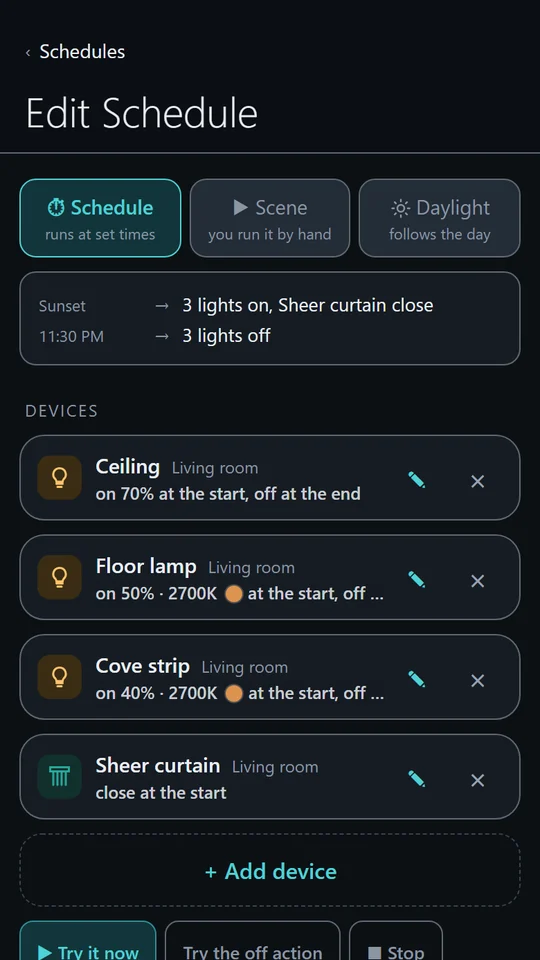
Chosen weekdays, once on a date, or only between two dates. Each schedule names its devices and the exact state they should reach — brightness, colour temperature, blind position, set point, volume. Test it once, then leave it alone.
Five kinds of “when”
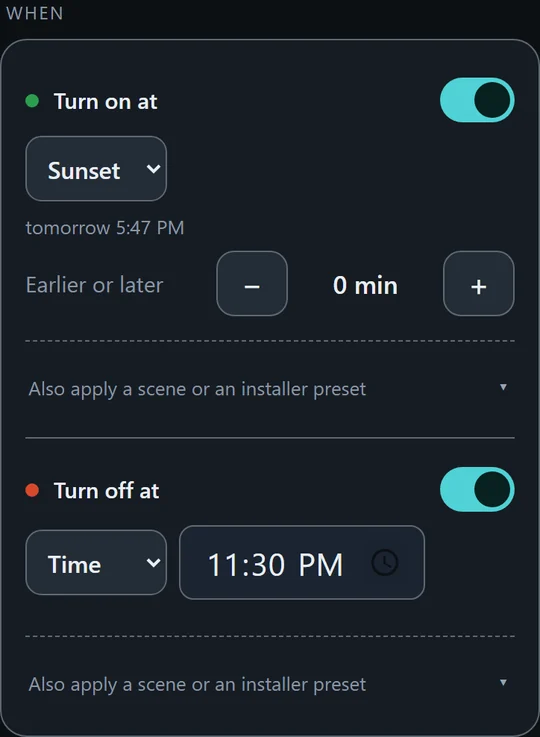
A clock time. Sunrise or sunset, from the project’s own latitude and longitude. A prayer time, per city. Or, for a scene, a key on a wall keypad. Offsets run in five-minute steps, six hours either way, and the page says when a time has already passed today. All computed on the controller.
Scenes, with an undo
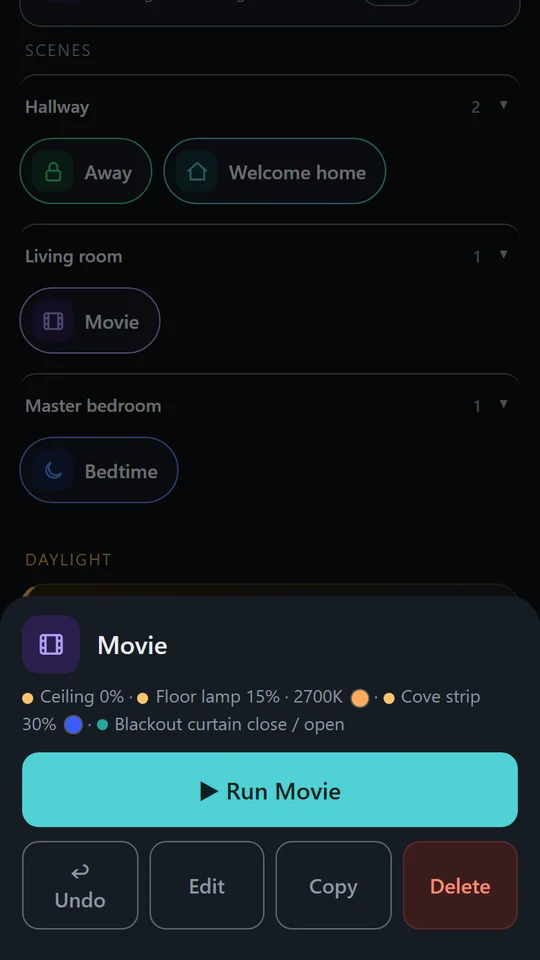
Bedtime, Away, Movie — defined once by the customer, run by hand from the app, and reused inside any schedule. Any device, not only lighting. Each scene has a run, an undo, and a Stop that puts the lights back the way they were.
A key on the wall
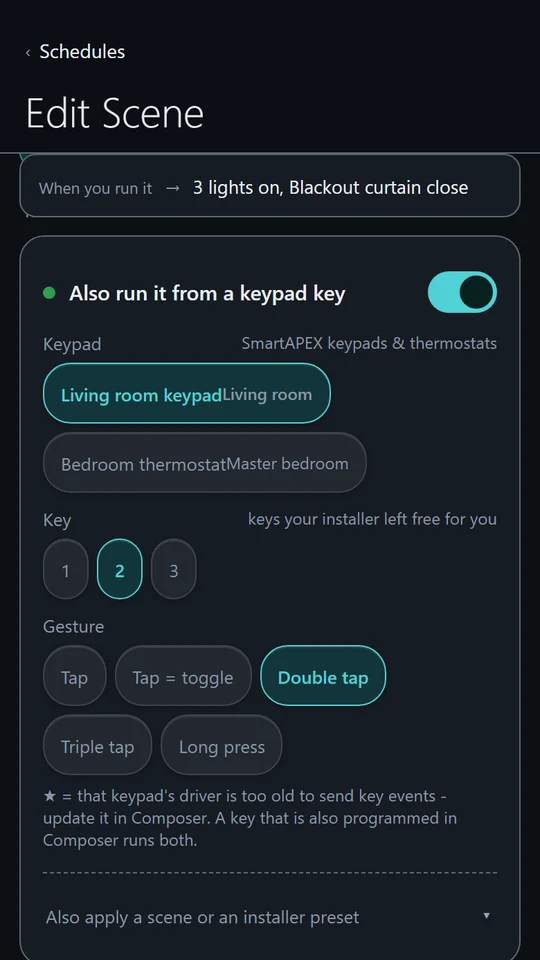
The customer picks a SmartAPEX keypad or thermostat, a key, and a gesture — tap, double tap, triple tap, long press, or tap = toggle, which switches the scene on and off from what the lights are actually doing. No Programming, no site visit. On a Home Center the same is done with a Fibaro remote or scene controller.
You stay in control: every key starts reserved for Programming, and you open the ones the customer may use — one property per key on the keypad driver, or one variable on the QuickApp. A keypad with no open key is never shown to the customer.
The house, not only the schedules
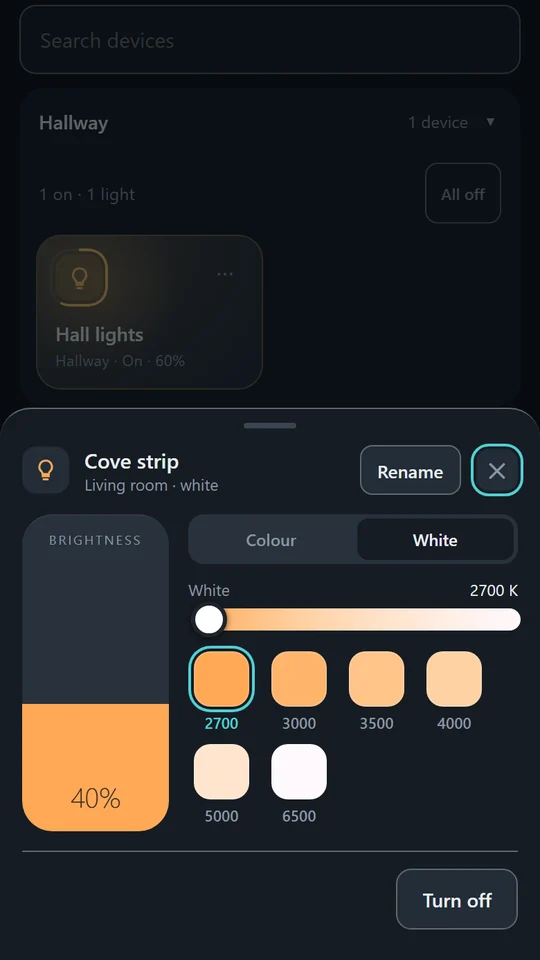
Every light, blind and thermostat, room by room. A tap switches a light; a hold opens it — brightness, white temperature in kelvin, or a colour. A thermostat gets a dial with its mode and fan. Each room has an All off.
The customer can rename any device or room in their own words, and nothing changes in your project. On a Home Center that includes locks, gates, sensors and meters — and network amplifiers and Sony televisions.
PartyPRO
Put the music on and the lights go with it. The customer picks a room and the fittings they want in it, and from then on it is one tap on a card — or one line inside a scene, so the same tap that closes the blinds and dims the room starts the party too.
A screen in that room does the listening: the APEX app on a wall panel, or a phone. Colour fittings step through a palette on the beat, tunable white sweeps through its temperature, a plain dimmer pulses. When it stops, every light goes back exactly where it was — level, colour and all.
- Runs from the app, a scene, a keypad, Control4 Programming or a Control4 touch screen.
- Only one screen ever drives the lights, so a room full of phones cannot fight over them.
- Nothing is recorded and nothing leaves the building — the sound is measured and thrown away frame by frame.
Music and adhanPRO
On Control4, room audio inside a schedule — volume, mute, and any playlist or announcement the installer has prepared. On a Home Center the page finds network amplifiers and plays their tracks and radio itself. Adhan plays at the exact prayer time.
Voice control
On Control4, any scene or schedule runs from Alexa, Google or Josh through a Voice Scene. “Alexa, turn on Bedtime” runs the scene the customer built.
Backup that survives
A backup file downloaded to the phone and restored from the page, on both platforms. On Control4 also a copy on the controller after every change, seven days deep, a one-tap backup to a USB stick, and Export / Import in Composer.
The same page on the wall, on the phone, and away from home.
A wall panel shows the rooms it is for. A phone reaches the house from anywhere. Neither needs your project open.
The APEX app for wall panels
One full-screen view of the page for an Android panel, with the habits a light switch needs: it never sleeps, it comes back by itself after a power cut, and the customer signs in once. Installed from smartapex.es/app; the installer’s settings sit behind seven taps on a corner.
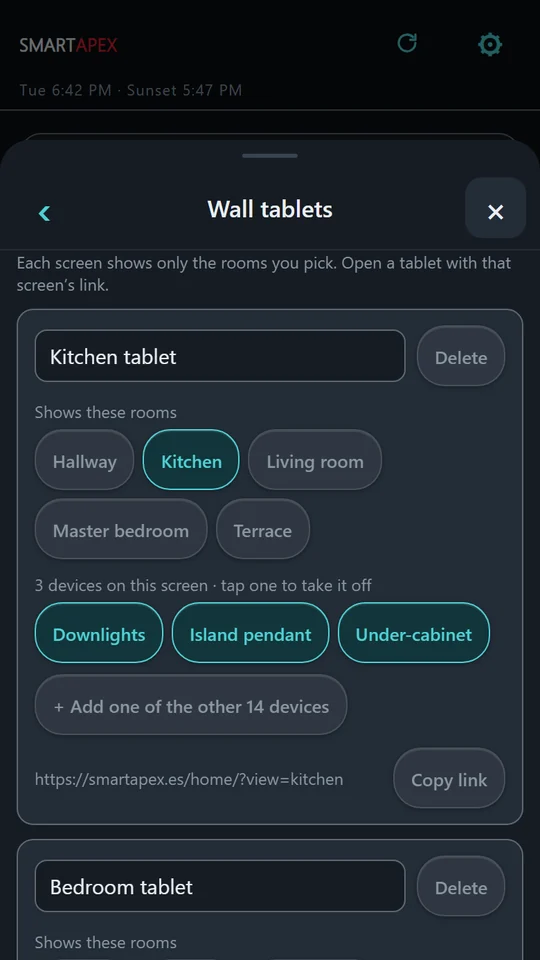
Screens give each panel its own rooms — the kitchen tablet shows the kitchen — chosen from a list on the panel, with nothing to type. On a Home Center the panel goes on working over the local network when the internet is down.
Away from home
The customer opens smartapex.es on a phone, signs in, and has the house. Added to the home screen it behaves like an app; there is nothing to install on an iPhone.
Invited, not handed a password
You invite the customer from the dealer portal. They get their own login to one controller — never your project, never your password — and you can invite the rest of the family the same way.
The schedules stay home
Everything fires on the controller. If the internet goes down, schedules, scenes and daylights keep running exactly on time; only the page from outside the house waits.
Control4 or Fibaro Home Center. One page, the same for the customer.
The engine that fires the schedules is the same code on both. What differs is how it is installed and licensed, and what each controller can reach.
Control4 · driver · OS 3.1.3+
A driver in the project
- Works inside the house with no internet and no account, licensed by a SmartAPEX IP module.
- Presets bridge to Programming: playlists, room audio and the adhan.
- Voice Scenes, PartyOn / PartyOff commands, USB backup and automatic copies.
- SmartAPEX keypads and thermostats as keys, opened one key at a time.
Home Center 3 · HC3 Lite · Yubii Home
A QuickApp on the controller
- Every device the Home Center reports, including locks, gates, sensors and meters.
- The controller’s own scenes as buttons, and Fibaro remotes as keys — only the ones you open.
- Network amplifiers (LinkPlay and UPnP) and Sony televisions, found on the network and used in schedules.
- Needs the internet to install and license; keeps firing for a month without it.
Daylight, finished properly.
Set a morning, midday and evening point — brightness and white temperature at each — and the lights walk the curve between them. Drag the points below to see what the room does.
- Switches on at the start, off at the end. Both are optional, and both are things Control4’s Daylight agent will not do.
- A light dimmed by hand is left alone until it is switched off and on again — the curve never fights the person in the room.
- White temperature goes where it can. CCT fixtures get it directly, RGB-only fixtures mix it, on/off lights join at the start and the end.
- Steps every 1 to 15 minutes, so a large DALI line is never loaded harder than it needs to be.
Drag a point to change brightness, or focus it and use the arrow keys. Pick a point to set its white temperature.
What changes when APEX Scheduler is in the project.
| Capability | Control4 on its own | With APEX Scheduler |
|---|---|---|
| Customer edits their own schedules | Composer, so the dealer does it | In the Control4 app |
| Daylight curve switches lights on / off | No — it only follows lights already on | Yes, at both ends |
| Sunrise / sunset with an offset | Yes, in Composer | Yes, from the app |
| Prayer times as a trigger | Not available | Fajr to Isha, per city |
| Customer-defined scenes with an undo | Lighting scenes only, set by the dealer | Any device, defined in the app |
| Voice control of those scenes | Voice Scenes | Voice Scenes, running APEX scenes |
| A wall key runs the customer’s own scene | Programming, by the dealer | Tap, double, triple, long press or toggle — chosen in the app |
| Dealer decides which keys the customer may use | — | Per key, on the keypad driver; closed by default |
| Stop a scene that was started by mistake | — | One tap, lights go back to their previous state |
| Lights that follow the music | Not available | A tap, or inside a scene — and everything goes back afterwards |
| Customer can back up their own work | Project backup, dealer only | USB stick or a file on the phone, one tap |
Three steps, then you are out of the loop.
Add the driver or the QuickApp
On Control4, drop the .c4z into Documents\Control4\Drivers and add it to any room. On a Home Center, upload the .fqax as a new device. One instance per project.
Name what you expose
Set the prayer country and city, open the keys and scenes the customer may use, and name any playlist or announcement the customer should be able to pick — Composer properties on Control4, QuickApp variables on a Home Center.
Hand it over
Invite the customer from the dealer portal, or let them open APEX Scheduler in the Control4 app, and put the APEX app on the wall panels. Every schedule they make afterwards is one you did not have to programme.
Installer & User Guides
One for each platform: requirements, setup, the licence and the cloud, presets and the adhan, prayer-time calibration, keys and which ones to open, wall panels and screens, Party, the customer’s side of the page with every screen pictured, backup and restore, and a troubleshooting table.
The licence
Control4: APEX Scheduler runs while at least one SmartAPEX IP module is online in the project — no subscription and no key for the schedules, scenes and daylights. The cloud — the page away from home, the APEX app, rooms and music, and prayer times — is one activation per controller, bought once, with the first 30 days free.
Home Center: one activation per controller, bought once from your dealer credits, with the first 30 days free.
- Mini IP Gateway V2
- IP Relay V2
- DALI Gateway V1
The IP modules that license a Control4 project. Sunrise, sunset and prayer triggers need the project’s latitude and longitude — in Composer, or in the Home Center’s location settings.
Put it in your next quote.
Dealers download the driver, the QuickApp and the guides from the SmartAPEX portal. Not a dealer yet? It takes one conversation.